QWAY: objects, source and manipulation
Object workflow
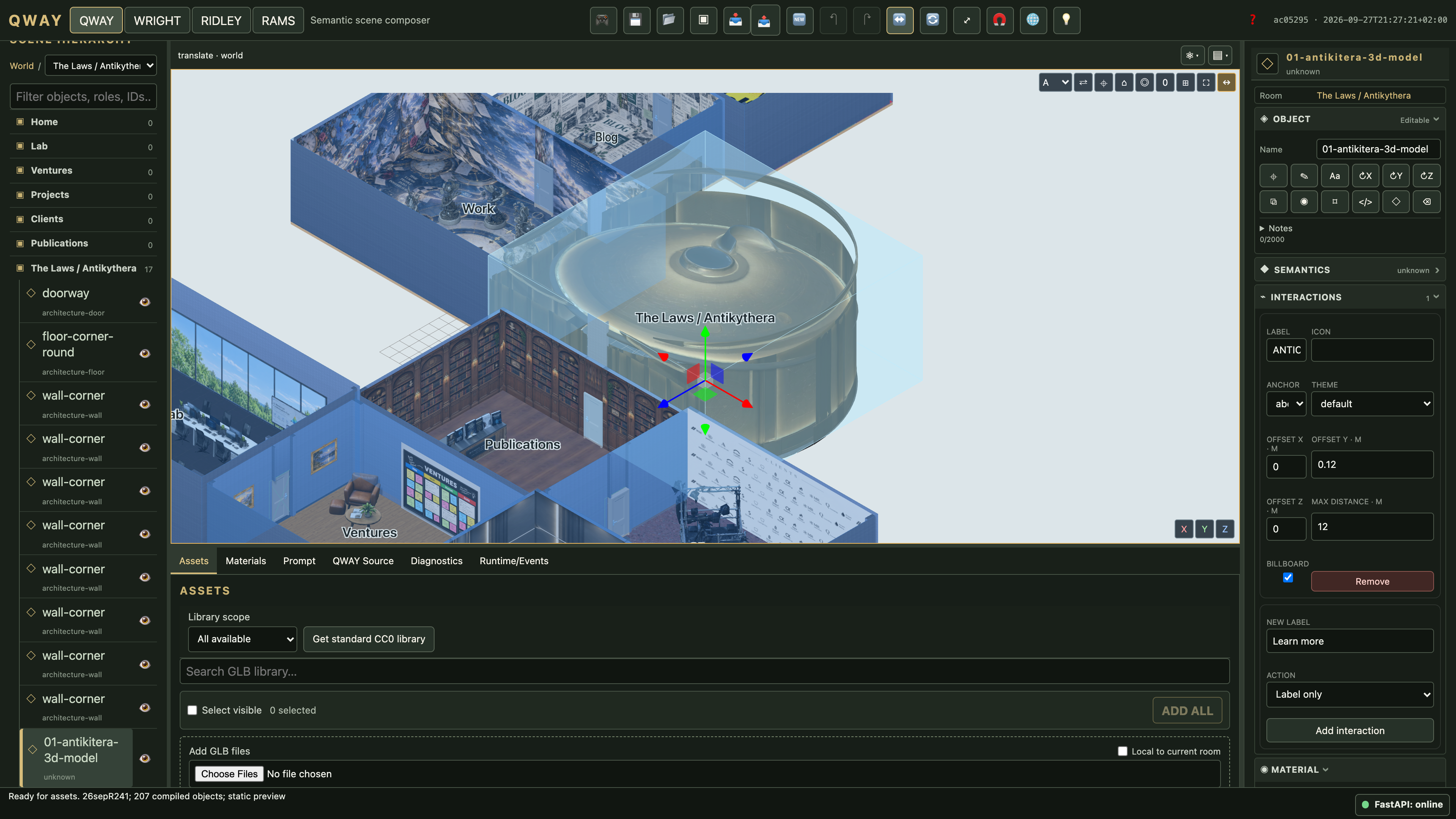
Asset records describe reusable bytes. Scene instances reference asset and manifest revisions. Selecting an instance exposes transform, semantic role, relations, physics, animation, notes and asset information. The QWAY Materials tab lists shared semantic materials with name, alias and preview. Select a card to edit it in the right-hand Inspector, drag its card onto an unlocked object, wall, floor or poster, or use Apply to selection from the keyboard. Assignments support undo/redo and save/reload; shared edits affect every assigned surface. Labels are human-facing; identity remains a UUID.
Inspector and context-menu actions include focus, semantic notes, rename, rotate 180° around X/Y/Z, duplicate, visibility, transform lock, show source, inspect asset and remove instance. Y half-turn shows an opposite face while staying upright; X/Z half-turns also invert up/down. These operations author explicit poses around the measured bounds center, never rewrite GLB bytes.
Constrained manipulation
A relation such as “on desk worktop” is more than a coordinate. Supported drags update an appropriate semantic local parameter; unsupported changes must diagnose or explicitly break the constraint. Hard failures are not silently converted to soft successes. See independent relation evaluation.
Direct the scene
Use meaningful asset names and notes: “wall with a door on its left side” is more informative than a download filename. Names containing wall/muro and door/porta describe a wall-with-door; door without wall describes a door asset. Ambiguous matches require disambiguation, not arbitrary substitution.
Compose establishes a scene; Revise modifies the existing source with bounded operations. Explicit sizing, orientation and boundary intent override inferred defaults. “Back” refers to scene/room coordinates, not whichever side the orbit camera currently sees. Left/right relations can instead be target-local; inspect the generated relation.
A provider cannot invent asset, instance or surface IDs. Review partial-application warnings. A request rejected because of an invalid draft needs compilation or deliberate restoration of accepted source before further semantic editing.
Physics and animation controls
Use the compact Physics and Animations dropdowns at the viewport edge to expose runtime controls. Enabling a physics profile does not start simulation. Play, Pause, Step, Reset and Stop operate on runtime state; the animation controls use actual clips from the asset manifest.
Stop simulation before authoring transforms or materials. A missing clip or collider requires valid asset evidence; playback cannot manufacture a walk cycle or repair an unrigged model. See player lifecycle.
Surface appearance
The Materials guide covers the browser, right-hand Inspector, shared resources, Make unique, maps and assignments. Material edits belong to the same project history as scene edits.
Observed prompt → source edit
Prompt: Make the desk 110 cm high. Captured from the real public-fixture browser test, using deterministic explicit-sizing interpretation with AI disabled. The instance identity and dependency pins remain unchanged. This demonstrates the supported sizing path, not arbitrary offline natural-language understanding.
Before
\scene[name=workshop,id="f3d58413-d31d-4eff-9c38-424f015009da"]{
\room[name=room,id="3e2f4f3e-b1db-4a04-b4b0-89ed0af09c98",size=(6m,3m,5m)]{}
\object[name=desk,id="52bfc36c-1fa7-4061-95c8-fbe1a65080ef",asset="705a41f9-65a7-449b-840a-fe852ca13fb8",manifest="0b0aaa5f-7841-45a4-a18a-7c76a67231cb",role=desk,label="Workshop desk"];
}
After successful compilation
\scene[name=workshop,id="f3d58413-d31d-4eff-9c38-424f015009da"]{
\room[name=room,id="3e2f4f3e-b1db-4a04-b4b0-89ed0af09c98",size=(6m,3m,5m)]{}
\object[name=desk,id="52bfc36c-1fa7-4061-95c8-fbe1a65080ef",asset="705a41f9-65a7-449b-840a-fe852ca13fb8",manifest="0b0aaa5f-7841-45a4-a18a-7c76a67231cb",role=desk,label="Workshop desk",sizing=auto,height=1.1m,heightReference=whole-bounds];
}
These are capture-specific public test UUIDs, not IDs to paste into a different project. The browser acceptance compiles this edit against its real imported manifest and asserts height=1.1m and unchanged identity. Use your current project’s pins when repeating the instruction. A broad role-edit prompt can instead report AI unavailable; the guide does not claim the fake provider understands every request.