WRIGHT: world and spaces
Create a world
- Choose WRIGHT. Adopt the current scene into a room or create rooms.
- Set each room’s label, dimensions and frame; assign object membership.
- Connect compatible spaces through portals. Inspect width, height, endpoints and passage diagnostics.
- Describe room purpose and furnishing needs, then generate/compose using the shared asset library.
- Open a room in QWAY for local object work. Return to WRIGHT to inspect the whole world.
Room duplicate/content operations preserve the distinction between new identities and reused asset bytes. World movement changes room frames, not every authored local pose.
Typed topology, not a third language
There is no implemented textual WRIGHT DSL. The authoritative topology is wright.world/1, carried in the same project alongside QWAY source. Visual and prompt operations produce typed world edits. See the complete generated contracts.
| Field | Meaning |
|---|---|
| identity | World UUID |
| levels | Level metadata; not a stair navigation solver |
| rooms | UUID, alias, label, parent, level, size [width,height,depth], rigid frame |
| membership | Object UUID → room UUID; one owner per object |
| portals | UUID, alias, from/to rooms, width, height, traversable, optional door, relative frame |
Room coordinates
Frames support translation and Y-axis rotation, not room scaling or tilt. Objects remain local to their owning room; compiled projection contains world transforms. Nested frames can render, but nested/vertical navigation has explicit limits. Cross-room QWAY geometric relations are not silently evaluated as local relations.
Supported passage proof is conservative for same-level root axis-aligned rooms. A requested aperture, physical clearance and actor passage are separate claims. Portals alone do not modify GLB geometry.
Furnish and verify
World planning selects room purposes, assets, counts and topology; TypeScript computes transforms. Explicit category/count/alias intent wins over default furnishing profiles. Offline manual editing remains possible. Circulation uses bounded samples/search, not a building-code or accessibility certification. Inspect Diagnostics and the actual room view before export.
Inspect the room before its contents
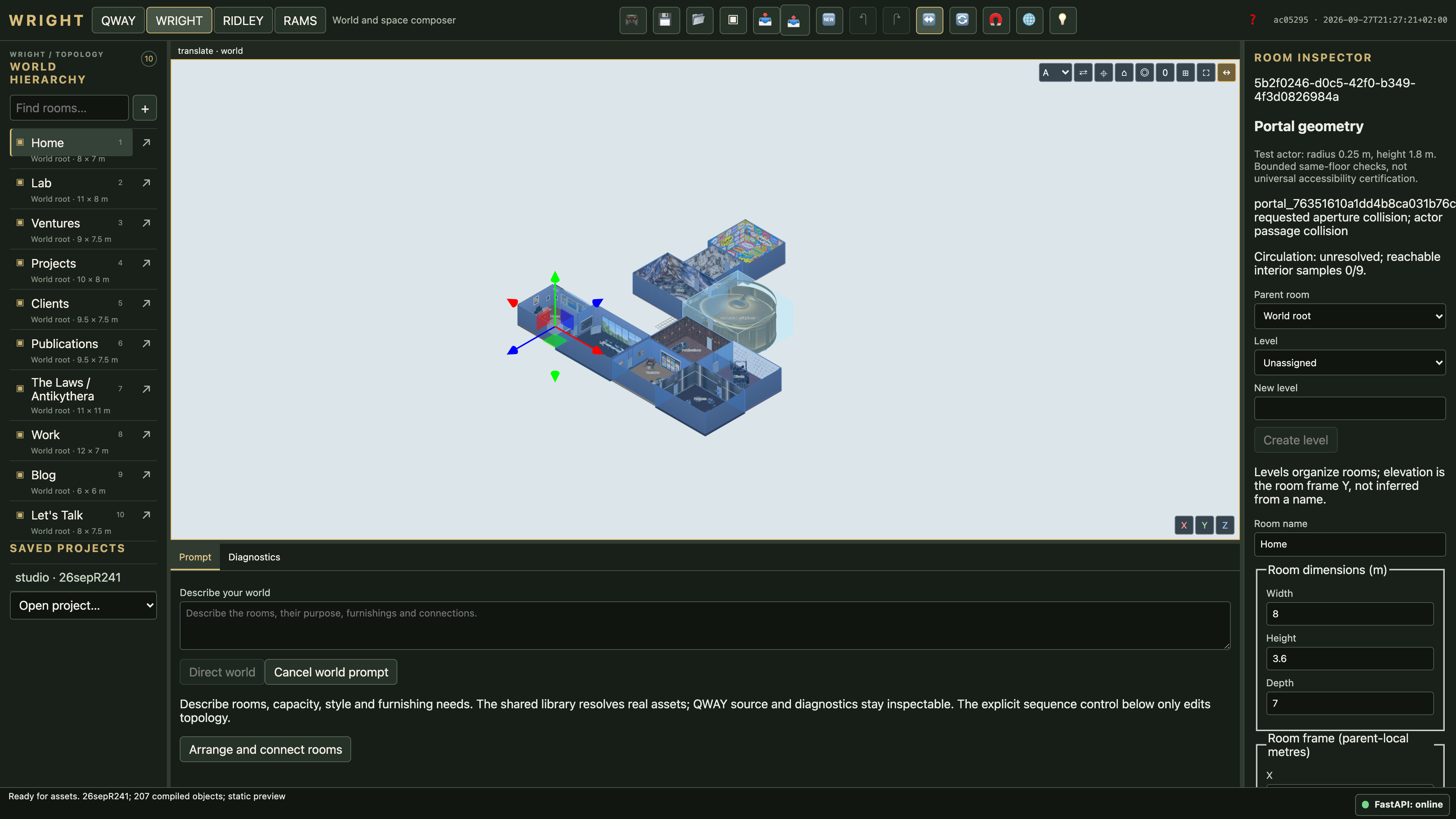
Select a room to edit its label, dimensions, position, orientation and supported backdrop settings. Use its object membership to distinguish local contents from adjacent architecture. Choose Open in QWAY for detailed object work; do not move an entire room to correct one local object.